Claim Your Listing on opshops.co
If your business, op shop, or organisation is already listed on opshops.co, you can claim the listing to take full control of it.
Once claimed, verified, and activated, you’ll be able to manage your page directly — keeping information accurate and engaging for our audience.
Step 1: Find Your Listing
- Go to Search or Places
- Search for your business name or browse by category
- Open your listing to confirm it’s the correct one
Step 2: Create an Account
- Click Register to create an account on opshops.co
- Use your official business email address where possible (e.g.
info@yourbusiness.com)
- If that’s not available, use the primary email associated with the business
Using a business email helps us verify ownership and speeds up approval.
Step 3: Submit a Claim Request
- Log in to your account
- Visit your listing page
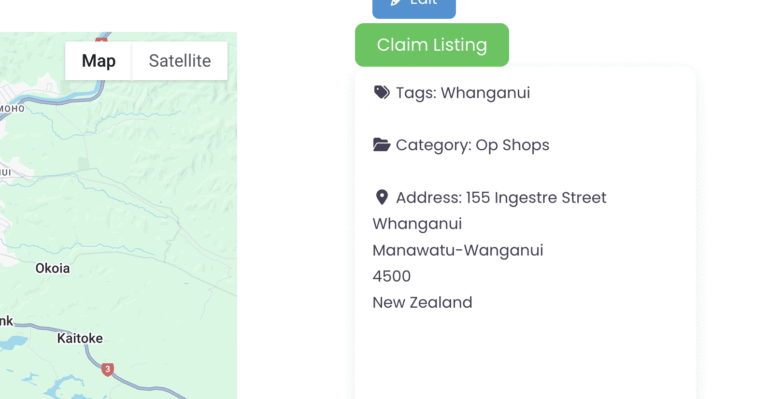
- Click Claim Listing on the listing sidebar
- Complete the claim request form
- Choose pricing option
You may be asked to provide supporting details such as:
- Website or social media links
- Phone number
- Other proof of association with the business
Step 4: Verification & Approval
Our team will review your request and verify the information provided.
If everything checks out:
- Your claim will be approved
- You’ll receive an email confirming approval
Step 5: Manage Your Listing
Once activated, you’ll have access to your listing, select a pricing package that includes the options you need.
- Edit business details (address, hours, contact info, website)
- Update your page with offers, events, announcements, or promotions
- Upload full-colour photos, logos, and videos
- Respond to reviews
✅ Tip for Faster Approval
Register using your business email and ensure all details are accurate when submitting your claim — this helps us verify ownership quickly.
Don’t see your business listed yet?
You can add it yourself.
Simply:
- Select a pricing package
- Upload your business details
- Submit your listing for approval
Once approved, your listing will go live and you’ll be able to manage it from your account dashboard.
👉 Add a Listing to get started.

Leave a Reply
You must be logged in to post a comment.